SQLRD SSRS Data Driven Automation7.4.20191016
Publisher Description
Data Driven & Automated SSRS Reports with SQL-RD
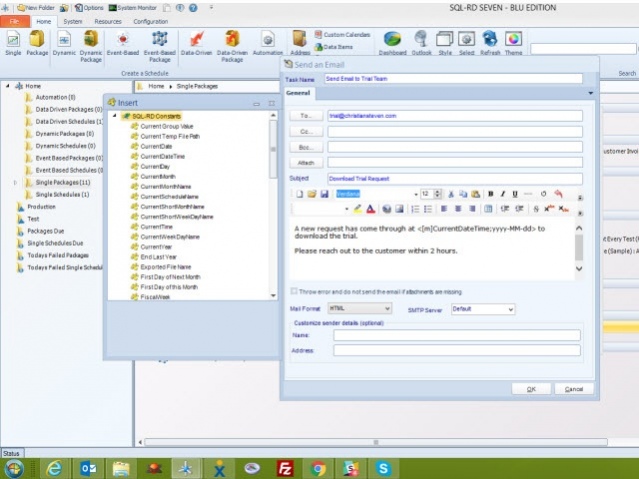
SQL-RD is a dynamic, flexible, function-rich & intuitive automation tool for scheduling, exporting, distributing & delivering your Microsoft SQL Server Reporting Services (SSRS) Reports. Automate report delivery in SSRS & send the reports to printer, fax, folder, FTP, SMS, DropBox, Sharepoint & email in a number of formats including Excel, Word, PDF, Txt, CSV & more. SQL-RD contains powerful system, event triggered, data-driven & business process workflow functions which will make an instant impact on the efficiency of your business.
Automate SQL Reports
Simply set up a 'schedule' stating how often you would like each report to run, whether you'd like the output in Word, Excel, HTML, RTF, Acrobat, XML or CSV & who it should be sent to. SQL-RD will do the automated delivery for you, delivering reports to folder, email, printer, fax, DropBox, Sharepoint, FTP or SFTP! You can even select, manage & schedule reports hosted in different SSRS instances.
Date & Time Scheduling
Schedule SSRS Reports to run at a specific date & time, or to run them hourly, daily, weekly, or monthly or set up your own custom frequencies e.g. 4-4-3, every other day, third Monday of the month, & so on. And the same report can be scheduled to be run multiple times with different parameters, formats, frequencies, & destinations.
Event Triggers
Respond to your business needs by setting schedules to run based on events & triggers rather than date. Add real-time monitoring to your SSRS Reports distribution process with SQL-RD's Event Based Schedules, reports are fired off when events occur e.g. database value is present, file is modified, window is open, an email is received, etc.
Dynamic & Data Driven
Use SQL-RD's unique Dynamic & Data Driven Schedule processes to trawl through your database to find the parameter values to use & then generate & deliver a unique report for each value.
About SQLRD SSRS Data Driven Automation
This Databases & Tools program is available in English. It was last updated on 29 September, 2026. SQLRD SSRS Data Driven Automation is compatible with the following operating systems: Windows.
The company that develops SQLRD SSRS Data Driven Automation is ChristianSteven Software. The latest version released by its developer is 7.4.20191016.
The download we have available for SQLRD SSRS Data Driven Automation has a file size of 790.6 MB. Just click the green Download button above to start the downloading process. The program is listed on our website since 2019-10-16 and was downloaded 11 times. We have already checked if the download link is safe, however for your own protection we recommend that you scan the downloaded software with your antivirus. Your antivirus may detect the SQLRD SSRS Data Driven Automation as malware if the download link is broken.
How to install SQLRD SSRS Data Driven Automation on your Windows device:
- Click on the Download button on our website. This will start the download from the website of the developer.
- Once the SQLRD SSRS Data Driven Automation is downloaded click on it to start the setup process (assuming you are on a desktop computer).
- When the installation is finished you should be able to see and run the program.
Program Details
System requirements
Download information
Pricing
Version History
version 7.4.20191016
posted on 2019-10-16
Ability to cache SSRS authentication details so that it can be used in the future.
Ability to 'Right Click' a schedule from within the error log and access the properties of the schedule.
Ability to use an 'insert' to dynamically populate the number of print pages required.
And more!
version 7.4.20190701
posted on 2019-07-02
Ability to lock SSRS accounts or share them with other users
Fixed:
Event Schedules fail when the object is open
Email Log fails to load
System Monitor History period can't be changed from 14
Issue with HTML format in Email destination
Non-admin user can't see the created schedule
And more!
version 7.4.20190424
posted on 2019-05-07
Read/delivery receipt are now separate options and work as expected
Data items used in a schedule convert to the values expected
Daily schedules with repeat every option execute when expected
Fixed issues when clicking Help and Check for Updates
Registration & Activation wizard works as expected
version 7.4.20190327
posted on 2019-04-01
Enhancements:
- Ability to send Microsoft SSRS Reports to Google Sheets.
Issues Resolved:
- Ability to use multiple SMTP servers to send emails.
- Password protecting Excel worksheets with 64-bit version of Excel.
- Additional performance improvements & minor bug fixes included in this release.
version 7.4.20190123
posted on 2019-01-28
Enhancements:
Ability to send emails with non-Latin language using UTF-8 encoding
A sample account has been added to the accounts library for use of basic testing
Issues Resolved:
Errors caused by the email log within the system monitor have been resolved
and more
version 7.4.20181120
posted on 2018-11-20
Enhancements:
Ability to create and re-use SSRS accounts
Issues Resolved:
Ability to update your license details in the 'About SQL-RD' screen
Additional performance improvements
version 7.4.20180926
posted on 2018-09-28
Enhancements
New group permission that allows SQL-RD administrators to force a SQL-RD users' Microsoft SSRS credentials to be entered when scheduling a report
Issues Resolved
Reports exported to Excel are now named as expected when merging reports in Data driven packages
Performance improvements
version 7.3.20180530
posted on 2018-05-30
Enhancements:
- Updated process watcher for manual executions
Issues Resolved
- Trial pop up during manual executions
- Email destination set to embed HTML now work as expected
- Additional performance improvements have been included in this release
version 7.3.20180208
posted on 2018-02-08
Dropbox destination has been updated to work with Dropbox API version 2
SSIS variables now work as expected within an SSIS package task
Additional performance improvements have been included in this release.
